A customer finds your business on Google.
They check whether you’re open, decide to call or visit, and take the next step.
However, if the hours are wrong, that opportunity can disappear.
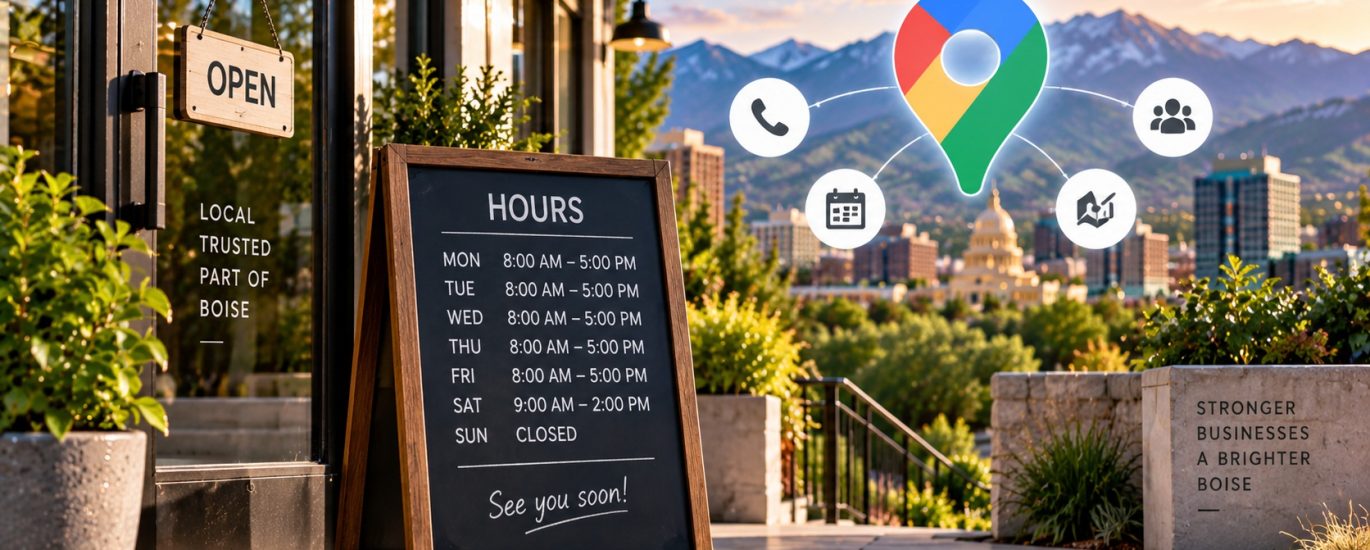
Keeping Boise Google Business Profile hours accurate is a simple but important part of managing your local search presence.
For service businesses, accurate hours help customers understand when they can reach you and reduce unnecessary friction between discovery and contact.
Getting found matters. Being accurate when customers find you matters too.
Why Google Business Profile Hours Matter
Your business hours are one of the practical details customers can use when evaluating a local company.
Someone searching for a service may want to know:
- Are you open today?
- Can I call now?
- Are you available on weekends?
- Do your hours change during holidays?
- When can I expect someone to answer?
- Is this listing still active?
Clear information makes the next decision easier.
Incorrect information does the opposite.
Boise Google Business Profile Hours Should Match Reality
Your profile should reflect how your business actually operates.
That sounds obvious.
However, operating hours can become outdated after:
- Schedule changes
- Seasonal adjustments
- Staffing changes
- Business expansion
- Holiday closures
- Changes in customer-service availability
If nobody regularly reviews the profile, old information can remain visible.
That’s why Google Business Profile management shouldn’t be treated as a one-time setup project.
Incorrect Hours Create Customer Friction
Imagine someone needs a local service.
Google indicates the company is open.
The customer calls.
Nobody answers because the business actually closed an hour earlier.
The customer now has a reason to try another provider.
For a physical location, the experience can be even worse if someone drives there based on inaccurate information.
Small information errors can create real customer frustration.
Local visibility should lead customers toward a smooth next step.
Regular Hours and Special Hours Serve Different Purposes
Your normal operating schedule establishes when customers can generally expect your business to be available.
However, exceptions happen.
Holidays, special events, temporary closures, and seasonal schedules can affect availability.
Instead of changing normal hours every time an exception occurs, businesses should use the appropriate Google Business Profile features available for temporary schedule changes.
The objective is simple:
Keep normal information stable while accurately communicating exceptions.
Holiday Hours Shouldn’t Be an Afterthought
Holidays are easy to overlook.
They’re also periods when customers may specifically check Google before contacting a business.
Before major holidays, review your profile.
Confirm whether you’re:
- Open normally
- Operating reduced hours
- Closed
- Using a different schedule
Then update the appropriate information.
A short recurring calendar reminder can turn this into a repeatable process.
Service Businesses Need Clear Hours Too
Business hours aren’t only important for restaurants and storefronts.
They’re relevant to service businesses as well.
A Boise pest control company, lawn care provider, pool service, dog trainer, or other local operator may not depend on walk-in traffic.
However, customers still want to know when the company is available.
For service businesses, hours can communicate when customers can reasonably:
- Call
- Request assistance
- Speak with staff
- Schedule services
- Expect normal business operations
That makes accurate profile information part of the customer journey.
Don’t Confuse Business Hours With 24/7 Lead Collection
Your website may accept forms around the clock.
That doesn’t necessarily mean your business operates 24 hours a day.
Customers should receive an accurate picture of actual availability.
For example, someone might submit an estimate request at midnight even though your team answers inquiries during normal business hours.
Those are two different things.
Your marketing systems can collect leads continuously without presenting misleading operating hours.
Keep Your Website and Google Profile Aligned
Google isn’t the only place customers may check your schedule.
Your website might also display operating hours.
Therefore, when hours change, review both.
Depending on your online presence, you may also need to check important business directories and other customer-facing platforms.
The principle is straightforward:
One business should present one accurate operating schedule wherever customers rely on it.
This connects Google Business Profile management with broader Local SEO consistency.
Build an Hours-Update Checklist
Accuracy becomes easier when it is systemized.
Create a simple checklist for schedule changes.
For example:
Step 1: Confirm the new operating schedule.
Step 2: Update your Google Business Profile when necessary.
Step 3: Check the website.
Step 4: Review important customer-facing listings.
Step 5: Verify upcoming holiday exceptions.
Step 6: Confirm everything after publishing changes.
A five-minute process can prevent weeks of outdated information.
Assign One Person Responsibility
Local profiles can become inconsistent when nobody owns them.
One employee assumes another person updated Google.
The website team assumes operations handled it.
Operations assumes marketing handled it.
Nothing changes.
Assign responsibility for monitoring important business information.
That person doesn’t necessarily need to make every business decision.
They simply need a process for ensuring approved changes are reflected online.
Accountability prevents simple updates from becoming forgotten tasks.
Review Hours After Major Business Changes
Certain events should automatically trigger a profile review.
Examples include:
- Moving locations
- Expanding service capacity
- Changing office schedules
- Opening or closing a location
- Seasonal operating changes
- Rebranding
- Changing customer-support availability
Don’t update one piece of the digital presence and assume everything else will follow automatically.
Use significant business changes as a trigger for a broader Local SEO information check.
Accurate Hours Support a Better Customer Journey
Local SEO is often discussed in terms of rankings.
But the customer experience after the search matters too.
Consider this journey:
Local Search → Google Business Profile → Business Information → Call or Website → Lead
Incorrect hours introduce friction directly in that path.
Accurate information removes one unnecessary obstacle.
That’s why profile optimization should consider both visibility and usability.
Combine Hours Management With Full GBP Optimization
Business hours are only one component of a complete profile.
Legacy Engine’s Google Business Profile Optimization service also addresses profile elements such as:
- Categories
- Keywords
- Photos
- Services
- Review generation
- Posting strategy
The goal is to create a stronger profile rather than optimize isolated fields.
When the entire profile is maintained strategically, customers receive a clearer representation of the business.
Don’t Set It and Forget It
Google Business Profiles need ongoing attention.
Information changes.
Customer expectations change.
Services change.
Schedules change.
Build recurring profile reviews into your Local SEO workflow.
A practical review can check:
Hours → Services → Categories → Photos → Reviews → Business Information
That keeps optimization connected to the actual business.
How Legacy Engine Approaches Google Business Profile Optimization
Legacy Engine provides Google Business Profile Optimization as part of its turnkey Local SEO system for service-based businesses.
The system also includes:
- Local Landing Page Framework
- Link Building & Citations
- Weekly SEO Content Publishing
Together, these components help service businesses build a broader local search presence instead of relying on one isolated SEO tactic.
Learn more About Legacy Engine and its Local SEO system.
Make Every Local Search Interaction More Accurate
Your business hours may seem like a minor profile detail.
To a customer deciding whether to contact you, they aren’t minor.
Keep your regular schedule accurate.
Plan for holidays.
Align your website and profile.
Assign responsibility for updates.
Review information after operational changes.
Then make profile maintenance part of your ongoing Local SEO system.
Visibility creates the opportunity. Accurate information helps customers act on it.
Ready to strengthen your Google Business Profile and local search presence? Contact Us to connect with Legacy Engine.
Frequently Asked Questions
Why are accurate Google Business Profile hours important?
Accurate hours help customers understand when your business is available and reduce friction when they want to call, visit, or take the next step.
Should service businesses list business hours on Google?
If the Google Business Profile supports hours for the business, the information should accurately represent how the company operates and when customers can reasonably interact with it.
Should Google Business Profile hours match my website?
Customer-facing operating information should be consistent wherever people rely on it. When your normal schedule changes, review both your Google profile and website.
What should I do when holiday hours are different?
Review your profile before holidays and use the appropriate Google Business Profile options to communicate temporary or special schedules accurately.
How often should I review my Google Business Profile?
There is no universal schedule for every business. However, recurring reviews and checks after significant operational changes can help keep important information current.